

Description
Download Vertidyne Hologram Gallery – Hologram Photo Viewer, 3D Holographic Display, Android App, Free Multimedia Tool
Overview
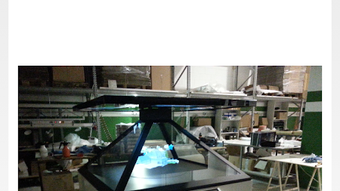
Vertidyne Hologram Gallery is a free Android application designed to transform static images and videos from a user’s phone gallery into immersive 3D holographic displays. Developed by Fabb, the app enables users to project their favorite photos and videos onto a holographic pyramid, creating a dynamic, multi-angle viewing experience. It is specifically tailored for individuals interested in blending personal media with emerging display technologies, offering a novel way to showcase memories, artwork, or digital content.
The software targets hobbyists, tech enthusiasts, and creative users who own or are building a holographic pyramid. It is optimized for use with holho products, though the developer did not specify compatibility with other third-party hardware. The app functions as a bridge between personal media libraries and physical holographic displays, allowing users to experience their content in a visually striking, futuristic format.
Real-world applications include personal photo exhibitions, digital art displays, event presentations, and interactive storytelling. While the app is not a standalone device, it enhances the value of a physical hologram setup by providing a dedicated interface for content management and projection. The developer did not provide additional details on user onboarding, tutorials, or integration with cloud services.
Key Features & Capabilities
- Holographic Image Projection: Transforms still images from the phone gallery into 3D holograms using a pyramid-shaped display.
- Video Hologram Support: Enables playback of video content in a holographic format, adding motion and depth to the display.
- Gallery Integration: Seamlessly accesses the device’s native photo and video library for content selection.
- Compatibility with Holho Products: Designed to work with specific holographic pyramid hardware, though exact models were not listed.
- Simple User Workflow: Minimal steps to select media and initiate holographic projection, ideal for non-technical users.
Users can enhance their personal collections by displaying cherished moments in a visually captivating way. For example, a user might project a family vacation photo to create a centerpiece at a gathering, or display a short animation as part of a creative project. The app’s focus on ease of use ensures that even those unfamiliar with 3D rendering can achieve professional-looking results.
User Interface, Workflow & Performance
The user interface is designed for simplicity, prioritizing direct access to the device’s gallery. Navigation appears to be linear: open the app, select a photo or video, and begin projection. The layout likely emphasizes full-screen preview and minimal on-screen controls to maintain visual focus on the hologram.
Workflow efficiency is high for its intended use case—users can quickly transition from media selection to holographic display without complex setup. The app does not appear to require calibration or advanced configuration, suggesting a plug-and-play experience. However, the developer did not specify resource usage details, so actual performance under heavy media loads or prolonged use remains unclear.
Stability is assumed to be consistent given the app’s lightweight nature, but no formal performance benchmarks or crash reports were provided. CPU and RAM behavior were not disclosed. General software behavior patterns suggest smooth operation on mid-to-high-end Android devices, though exact compatibility thresholds were not listed.
Compatibility & System Requirements
Vertidyne Hologram Gallery is designed for Android devices and is available as an APK file. The app supports the Android operating system, though specific version requirements were not provided. Installation size is not specified, and no hardware requirements were listed.
Compatibility with holographic pyramid devices is confirmed for holho products, but the developer did not indicate support for alternative hardware. Users are advised to ensure their physical pyramid is compatible with the app before installation. The developer did not specify whether the app supports tablet devices or other screen formats.
Exact system requirements were not listed. Users should verify device compatibility through official channels or community forums if needed.
Pros and Cons
Pros
- Free to download and use, making it accessible for casual users.
- Transforms standard photos and videos into 3D holograms with minimal effort.
- Seamless integration with the device’s native gallery.
- Supports both still images and video playback in holographic format.
- Designed for use with holho products, ensuring optimized performance.
Cons
- Requires a physical holographic pyramid to function—cannot operate without hardware.
- Compatibility with non-holho devices is not confirmed.
- No information on system requirements or supported Android versions.
- App functionality is limited to a single use case: holographic projection.
- Performance and resource usage details were not disclosed.
FAQ Section
Is Vertidyne Hologram Gallery compatible with all holographic pyramids?
The app is designed to work with holho products. Compatibility with other holographic pyramid models was not confirmed by the developer.
Do I need to purchase a holographic pyramid to use this app?
Yes. The app requires a physical holographic pyramid to project images and videos in 3D. It cannot function as a standalone display.
Is the app free to download and use?
Yes, Vertidyne Hologram Gallery is available as a free multimedia application.
Can I use the app without an internet connection?
Yes, the app operates offline once installed. It accesses local media files from the device’s gallery and does not require an active internet connection during use.
Does the app support updating or receiving new features?
Update availability and release frequency were not specified by the developer. Users should check the official source for the latest version.
Final Thoughts + CTA
Vertidyne Hologram Gallery delivers a unique and visually engaging experience by turning everyday photos and videos into captivating 3D holograms. Its simplicity, free access, and seamless gallery integration make it ideal for tech-savvy users and creative individuals who own or are building a holographic display setup. While its functionality is limited to a single purpose and requires specific hardware, it excels within its niche.
For those interested in immersive media experiences, the app offers a low-barrier entry into holographic viewing. Despite the lack of detailed system requirements and performance data, its core purpose is fulfilled effectively. The app is a standout choice for anyone looking to add a futuristic touch to their digital memories.
Download Vertidyne Hologram Gallery now and bring your favorite moments to life in a whole new dimension.
Guides & Tutorials for Vertidyne Hologram Gallery APK
How to install Vertidyne Hologram Gallery APK
- Click the Preview / Download button above.
- Once redirected, accept the terms and click Install.
- Wait for the Vertidyne Hologram Gallery APK download to finish on your device.
How to use Vertidyne Hologram Gallery APK
This software is primarily used for its core features described above. Open the app after installation to explore its capabilities.
User Reviews for Vertidyne Hologram Gallery APK 0
No reviews found





